 联系电话:023-68661681

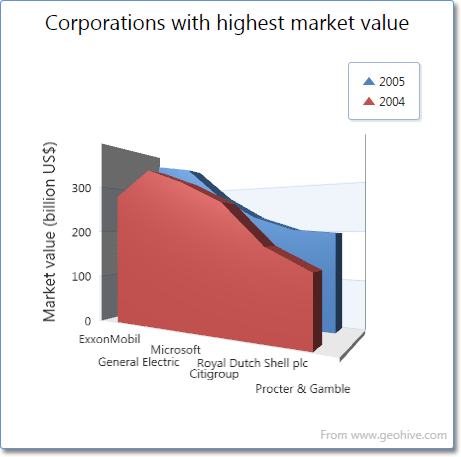
本示例演示如何用DevExpress WPF控件的 DXCharts 创建3D面积图。首先将 ChartControl.Diagram属性部署到XYDiagram3D下,然后添加两个AreaSeries3D对象到图像的Diagram.Series集合。具体示例如下:
<Window x:Class="Area3DChart.Window1" xmlns="http://schemas.microsoft.com/winfx/2006/xaml/presentation" xmlns:x="http://schemas.microsoft.com/winfx/2006/xaml" xmlns:dxc="http://schemas.devexpress.com/winfx/2008/xaml/charts" Title="Window1" Height="350" Width="500">
    <Grid>
        <dxc:ChartControl Name="chartControl1">
            <dxc:ChartControl.Diagram>
                <dxc:XYDiagram3D>
                    <dxc:XYDiagram3D.Series>
                        <!--region #Series1-->
                        <dxc:AreaSeries3D AreaWidth="0.7">
                            <dxc:AreaSeries3D.Points>
                                <dxc:SeriesPoint Argument="A" Value="10" />
                                <dxc:SeriesPoint Argument="B" Value="12" />
                                <dxc:SeriesPoint Argument="C" Value="14" />
                                <dxc:SeriesPoint Argument="D" Value="17" />
                            </dxc:AreaSeries3D.Points>
                        </dxc:AreaSeries3D>
                        <!--endregion #Series1-->
                        <!--region #Series2-->
                        <dxc:AreaSeries3D AreaWidth="0.7">
                            <dxc:AreaSeries3D.Points>
                                <dxc:SeriesPoint Argument="A" Value="5" />
                                <dxc:SeriesPoint Argument="B" Value="4" />
                                <dxc:SeriesPoint Argument="C" Value="10" />
                                <dxc:SeriesPoint Argument="D" Value="12" />
                            </dxc:AreaSeries3D.Points>
                        </dxc:AreaSeries3D>
                        <!--endregion #Series2-->
                    </dxc:XYDiagram3D.Series>
                </dxc:XYDiagram3D>
            </dxc:ChartControl.Diagram>
        </dxc:ChartControl>
    </Grid>
</Window>
效果图:
本站文章除注明转载外,均为本站原创或翻译
欢迎任何形式的转载,但请务必注明出处,尊重他人劳动成果
转载请注明:文章转载自:DevExpress控件中文网 [https://www.devexpresscn.com/]
本文地址:https://www.devexpresscn.com/post/471.html
欢迎任何形式的转载,但请务必注明出处,尊重他人劳动成果
转载请注明:文章转载自:DevExpress控件中文网 [https://www.devexpresscn.com/]
本文地址:https://www.devexpresscn.com/post/471.html





 返回
返回